HMI SCADA
HMI SCADA
Key Highlights
- HMI SCADA supports industrial automation by linking machine views with supervisory control.
- An HMI focuses on user interaction, while scada software manages wider monitoring and control.
- Together, they improve data visualization, alarm handling, and faster decisions from a central system.
- Operators use HMI SCADA for remote monitoring across equipment, lines, and remote sites.
- Core system parts include field devices, PLCs, RTUs, networks, and software components.
- Modern platforms add cloud tools, mobile access, historical data, and predictive maintenance support.
Introduction
In industrial automation, you need a control system that helps you see what is happening and respond fast. That is where HMI SCADA plays a key role. It supports industrial processes by combining operator visibility with centralized oversight, making daily operations easier to manage. You can monitor equipment, review performance, and act on issues before they grow. For facilities that depend on uptime, safety, and steady output, this mix of tools has become a practical foundation for better control.
Understanding HMI and SCADA
At a basic level, a human machine interface is the part of an industrial control system that people use directly. It gives operators a user interface to view machine status, alarms, and process values in a clear way.
A scada system works at a broader level. It gathers data from field equipment, sends it to a central platform, and supports supervisory control across larger operations. The difference is simple: HMI focuses on direct operator use, while SCADA handles wider monitoring, coordination, and system-wide visibility.
Defining Human-Machine Interface (HMI)
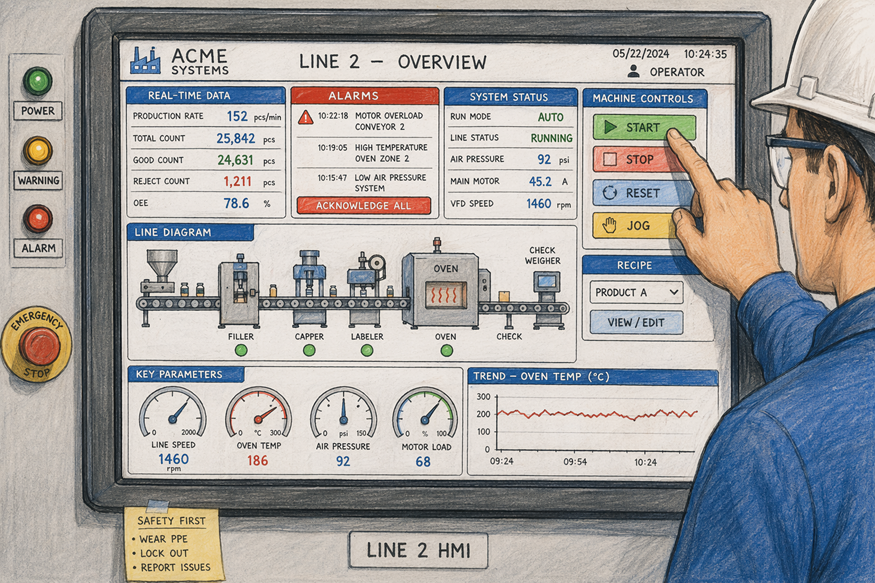
An HMI system is the user-facing layer of automation. It gives human operators a way to work with industrial equipment through screens, buttons, and touchscreen panels. In most settings, it presents a user interface that turns machine data into simple visuals you can understand quickly.
On the plant floor, this supports direct interaction with machines and processes. Operators can view status, spot faults, change settings, and send commands without dealing with raw controller code. That makes operator interaction faster and less confusing, especially when timing matters.
Most modern HMIs use graphical interfaces to display values, alarms, and process conditions in real time. In short, the main functions of an HMI in industrial automation are visualization, basic machine control, alarm awareness, and easier communication between people and automated systems.
What Is Supervisory Control and Data Acquisition (SCADA)?
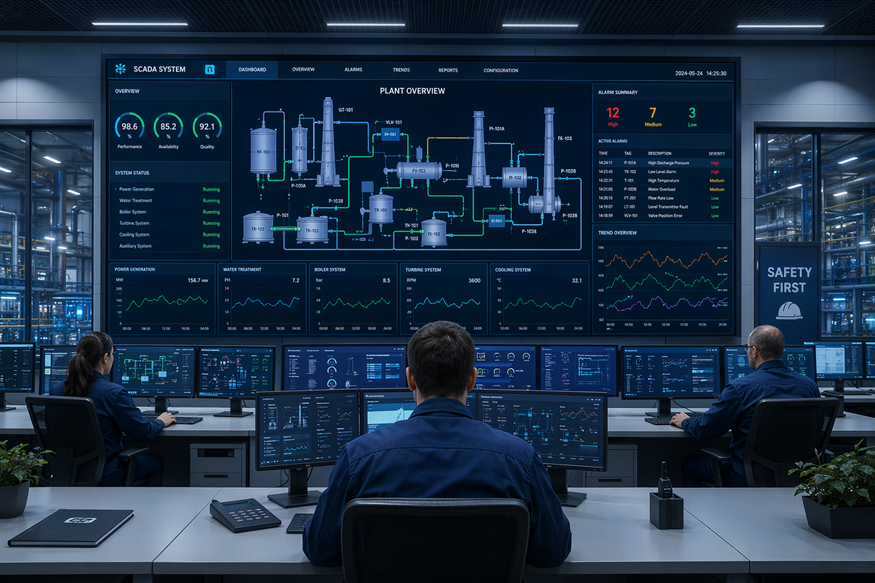
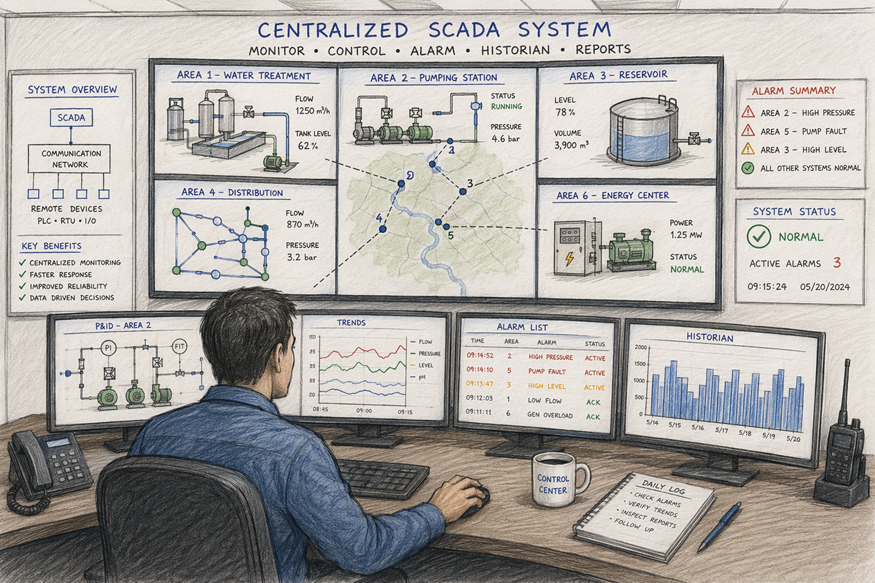
SCADA stands for Supervisory Control and Data Acquisition. It is an automation framework that helps you monitor, control, and optimize industrial processes from a central point. Instead of focusing on one machine, it looks across systems, lines, and sites.
In practice, scada software receives information from sensors, PLCs, RTUs, and other control equipment. That data acquisition process feeds live operating values into the system, where operators can review conditions, issue commands, and support remote monitoring when assets are spread out.
SCADA is important because it adds visibility, control, and speed. It also supports alarm management by flagging abnormal conditions and recording events. Since it stores historical data, you can review trends, improve decision-making, support compliance, and reduce downtime through better planning and earlier response.
Core Components of HMI SCADA Systems
Every HMI SCADA setup relies on connected system components that share data and commands. These usually include field devices, controllers, networks, operator displays, and central software working together across industrial systems.
Just as important are the software components behind the screens. They collect, process, display, and store information so you can monitor conditions and respond effectively. When you understand the hardware and software roles, it becomes easier to choose a system that fits your operations. The next sections break those pieces down.
Hardware Overview: Panels, Sensors, PLCs, and RTUs
The hardware side of HMI SCADA starts where work happens: on the plant floor. Field devices measure conditions, controllers run logic, and operator stations provide a visible point of control. In industrial plants, these devices form the physical link between process activity and the software that supervises it.
A typical setup may include:
- Control panels that house displays, switches, and local interfaces
- Sensors and actuators that measure and adjust process variables
- Programmable logic controllers that execute control logic in real time
- Remote terminal units that collect and transmit data from distant assets
RTUs are especially useful when equipment sits away from the main control area. They gather signals from field devices and send that information back to the central system. That makes them a practical fit for remote monitoring, distributed operations, and any site where direct local access is limited.
Software Features and User Interfaces
Software is what turns raw machine signals into something useful. HMI software creates the screens operators see, while the scada system manages monitoring, control, alarms, and broader communications. Together, they shape how people understand and run automated processes.
For daily use, the user interface needs to be clear and responsive. Good graphical interfaces show status, values, trends, and alerts without making operators search for key details. That reduces confusion and supports faster response times when something changes.
Many platforms also include data logging and historian functions. These tools save process values and event records over time, making it easier to review past performance, troubleshoot faults, and prepare reports. If you are evaluating options, look for visibility, ease of use, alarm tools, and reliable storage of operational data.
Key Differences Between HMI and SCADA
The main difference is scope. An hmi system gives operators a local or machine-level view inside an industrial control system. It helps with direct monitoring, operator input, and immediate machine control.
Scada software works at a higher level. It gathers information from multiple devices or areas and presents it through a central system, often in a control room. So if you are comparing them, think of HMI as the interface you use and SCADA as the broader platform that supervises many connected parts.
Roles in Industrial Automation
In industrial automation, HMI and SCADA have different purposes but support the same outcome: stable, efficient operations. HMI handles the point where people interact with machines. SCADA sits above that layer and coordinates visibility and control across a wider process.
You can think of their roles like this:
- HMI supports machine control through screens, buttons, and local operator views
- HMI also helps with operator control by showing alarms, values, and status changes
- SCADA provides supervisory control across multiple machines, subsystems, or sites
That is why they are often used together. The HMI helps an operator respond at the equipment level, while SCADA collects the bigger picture. This division of roles makes it easier to manage both immediate tasks and facility-wide performance without forcing one tool to do everything.
Scope, Scale, and Application Areas
Not every automation need is the same. Some industrial environments need a simple interface for one machine, while others need full visibility across many assets. That is where scope and scale separate HMI from SCADA in real-world application areas.
HMI usually serves local equipment or a single machine cell. SCADA is built for broader industrial operations, especially when data must be gathered and managed from a central location. Both support a control system, but they do so at different levels.
| Aspect | HMI | SCADA |
|---|---|---|
| Primary scope | Local machine or process view | Facility-wide or multi-site supervision |
| Main users | Equipment operators | Operators, supervisors, and control room staff |
| Typical scale | One machine or subsystem | Multiple systems from a central location |
| Common application areas | Panels, skids, workstations | Utilities, production networks, remote assets |
| Main purpose | Direct interaction and control | Monitoring, data collection, and oversight |
How HMI and SCADA Work Together
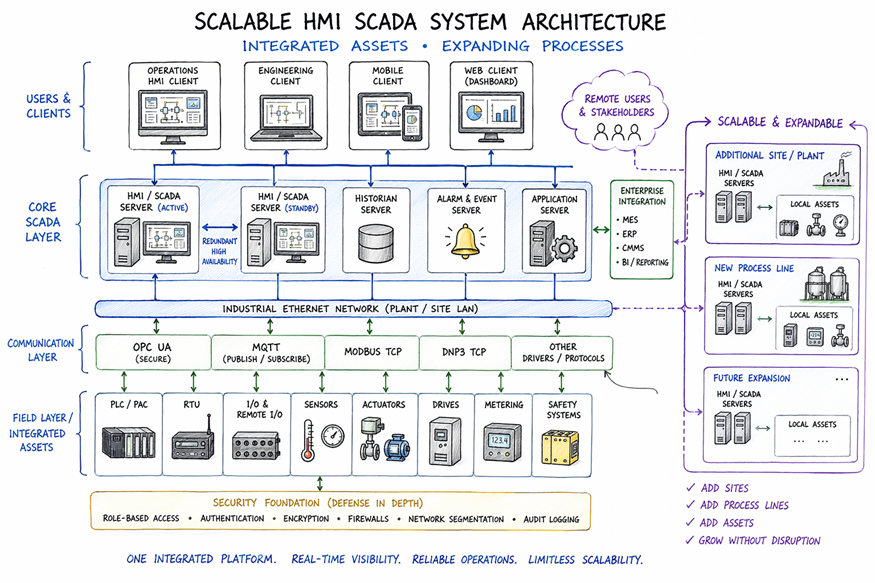
HMI SCADA works best when both layers are connected through a clear system architecture. Controllers and field devices collect values, SCADA organizes them, and the HMI presents them in a form operators can act on.
This integration creates a steady data flow from equipment to screens and back again as commands are sent. In industrial processes, that means better visibility, faster decisions, and more consistent control. To see how that works in practice, it helps to look at the structure behind the system and how facilities apply it.
System Architecture and Data Flow
A typical HMI SCADA system architecture begins with sensors, actuators, PLCs, and RTUs in the field. These devices collect process values and execute control commands. From there, information moves through the communication network to higher-level software.
That data flow carries operational data into a central system where it can be processed, displayed, stored, and analyzed. Operators then view the results through HMI screens, respond to alarms, and issue commands that move back through the network to the controllers.
This design works well across many industrial environments because it separates local control from centralized visibility. PLCs handle fast logic close to the equipment, while SCADA provides broader supervision. The HMI becomes the practical viewing and action layer, helping you understand what is happening without standing beside every machine.
Integration in Milwaukee Manufacturing Facilities
In Milwaukee manufacturing facilities, HMI SCADA integration can support a wide mix of automation systems. Production lines often depend on steady monitoring, quick alarm response, and clear operator views. When connected well, these tools help staff manage equipment performance without losing sight of the full process.
A practical setup may support:
- Central visibility into production lines, machine status, and alarms
- Better operational efficiency through faster decisions and less manual checking
This kind of integration is useful in manufacturing because many assets must work in sequence. Operators can use local HMI screens for immediate action, while supervisors review system-wide data through SCADA. The result is a more connected operation where issues are spotted earlier, response times improve, and routine oversight becomes easier to manage.
Main Functions of HMI in Industrial Automation
An HMI supports the day-to-day needs of operators by showing what machines are doing in real time. It improves process control through clear visualization of values, statuses, and operating conditions.
It also helps with alarm management and operator interaction. Instead of relying on guesswork, you can see warnings, review changes, and respond directly through the interface. That makes work safer and more organized. The next two sections focus on the HMI functions most people rely on first: live process views and direct operator control.
Real-Time Process Visualization and Alarming
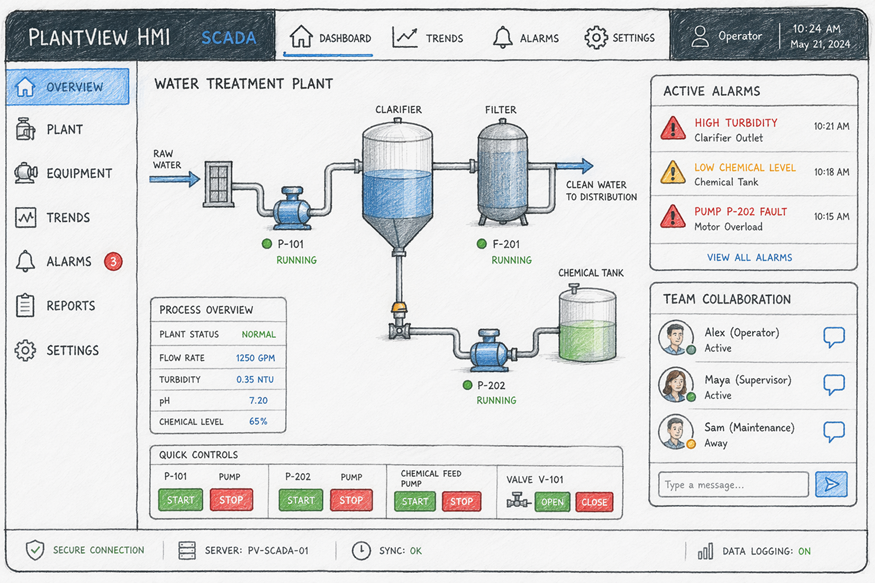
One of the strongest HMI functions is real time visibility. Operators can see values change as equipment runs, which makes it easier to understand current conditions and react without delay. In any industrial control system, that immediate view supports more confident decisions.
Good data visualization matters here. Screens can show process flows, machine states, trends, and performance indicators in a way that is easier to read than raw numbers alone. This reduces the learning curve and helps staff notice issues before they become larger disruptions.
HMI also supports alarm management through alerts tied to predefined thresholds. During continuous monitoring, the system can highlight abnormal conditions and draw attention to critical events. When paired with SCADA, these alarms can also feed wider reporting and remote awareness, strengthening both local response and broader oversight.
Operator Control and User Interaction
Beyond viewing data, a human machine interface lets people act on it. Operators use the screen to start, stop, adjust, or confirm actions tied to machine control. That makes the HMI a working tool, not just a display.
The quality of the user interface shapes how well this works. Clear layouts, readable graphics, and responsive touchscreen panels make operator control easier under normal conditions and during upset events. When the screen is simple to follow, human error is less likely.
Useful HMI interaction often includes:
- Touchscreen panels for quick command entry
- Clear status views that support faster operator decisions
- Simple control paths for routine machine control tasks
These features are part of why newer HMI technologies are valued. They make systems easier to use, improve awareness, and help teams respond with less delay.
Essential Functions of SCADA in Modern Industry
Scada software gives you a broader way to manage industrial processes. It gathers data, supports centralized oversight, and helps teams maintain control across equipment, lines, and remote assets in different industrial environments.
This wider visibility improves operational efficiency and supports predictive maintenance by revealing trends and early warning signs. Instead of reacting only after failure, you can use live and stored data to plan ahead. The next sections cover two core strengths of SCADA: collecting information from the field and turning that information into useful reporting and supervision.
Data Acquisition and Remote Monitoring
SCADA begins with data acquisition. Sensors, PLCs, and RTUs collect signals from equipment, then send those values into the system for processing and display. This steady flow of information gives operators a live view of industrial operations without needing to stand at each asset.
That matters even more when equipment is spread across remote sites. With remote access, teams can check status, review alarms, and respond faster from a control room or connected device. This helps reduce travel time and supports quicker action when process conditions shift.
Key benefits include:
- Better oversight of remote sites through centralized visibility
- Stronger data logging for analysis, troubleshooting, and reporting
Because information is stored as well as displayed, SCADA supports both immediate response and long-term improvement. You get current awareness and a useful history of how systems have been performing over time.
Supervisory Control and Automated Reporting
SCADA does more than show values on a screen. It supports supervisory control by letting operators and supervisors oversee large processes from one place. Commands can be sent through the system to adjust settings, start procedures, or respond to abnormal conditions.
Another major advantage is automated reporting. Instead of pulling information by hand, the system can organize stored records into useful summaries for operations, maintenance, and compliance needs. That saves time and gives teams a more consistent view of performance.
Over time, those records support data analysis and trend analysis. You can compare patterns, identify recurring faults, and turn raw information into actionable insights. This is one reason SCADA remains important for managing industrial processes: it connects live supervision with the historical evidence needed for smarter planning and better decisions.
Selecting the Right HMI SCADA Solution
Choosing an HMI SCADA platform starts with your industrial needs. You need software components that match the size of your operation, the kind of equipment you use, and the level of visibility your team requires.
It also helps to think ahead. A good system should support flexibility, scalability, and the quality standards your facility must meet. The best fit is not always the biggest platform. It is the one that works well today and can still support you as operations grow, connect, or change over time.
Evaluating Features for Industrial Needs
When you compare systems, start with the basics. Can the platform collect, display, and store operational data in a way your team can use? The right choice should make daily work clearer, not harder. That means matching software features to actual tasks on your floor.
You should also look at how the system supports visibility, alarms, reporting, and long-term improvement. Some platforms now extend further with machine learning and advanced analytics, which can help identify patterns and support predictive maintenance.
Helpful features to evaluate include:
- Clear dashboards for operational data and alarms
- Reliable historian and reporting tools for past performance review
- Advanced analytics or machine learning support for earlier issue detection
The goal is simple: pick a solution that serves current industrial needs while giving you room to improve decision-making, maintenance planning, and process consistency.
Considerations for Flexibility and Scalability
A system that fits one line today may need to support a full site tomorrow. That is why flexibility and scalability matter when choosing HMI SCADA. You want a platform that can handle added devices, more users, and broader visibility without forcing a full replacement later.
Remote access is part of that conversation too. Many teams now expect visibility beyond the control room, whether through secure workstations, web views, or mobile devices. This can be especially useful across larger industrial plants where staff may need quick updates without returning to one fixed station.
Scalability also supports change over time. As processes expand, new assets are added, or reporting needs increase, the system should grow with you. A well-chosen platform keeps performance steady while making future integration and expansion less disruptive.
Future Trends and Advancements in HMI SCADA
HMI SCADA is moving toward broader connectivity and smarter analysis. Mobile access, cloud integration, and ai applications are reshaping how operators and supervisors use automation data in daily work.
At the same time, modern hmi design is becoming more intuitive and responsive. These shifts support predictive maintenance, better visibility, and easier access to information across locations. If you are planning for the future, it helps to understand how newer tools improve both convenience and control while still supporting the core needs of industrial operations.
Mobile Access, Cloud Integration, and AI Applications
Newer platforms are expanding what HMI SCADA can do. With mobile access, operators and supervisors can check system status without staying at one terminal. That helps support remote operations and quicker awareness when teams are spread across a site or across regions.
Cloud integration adds another layer of value. It improves scalability, supports broader data access, and makes centralized review easier across facilities. When paired with modern hmi design, the result is a more flexible system that still keeps process information readable and useful.
Common advancements include:
- Mobile access through tablets or phones
- Cloud integration for wider visibility and data storage
- AI applications for anomaly detection and predictive maintenance
- Modern hmi layouts with clearer graphics and easier navigation
These are good examples of modern HMI SCADA solutions because they combine convenience, broader access, and stronger analysis without removing operator control.
Enhancing Security and Remote Operations
As systems become more connected, security becomes a bigger part of HMI SCADA planning. Modern platforms often include protections such as access control, authentication, and other measures that help limit unauthorized changes to critical processes and system components.
This matters even more during remote operations. If teams are monitoring equipment from outside the local area, they still need trusted visibility and safe control paths. Strong security helps maintain confidence while supporting faster responses to alarms and changing process conditions.
Better remote oversight also helps with practical goals like spotting abnormal conditions sooner and tracking energy consumption more effectively. When secure access, alarm awareness, and system data work together, operators can manage distributed assets with fewer delays and more confidence in what the system is showing.
Conclusion
In conclusion, HMI SCADA systems play a crucial role in modern industrial automation by facilitating real-time monitoring and control of processes. Understanding the interplay between Human-Machine Interfaces and Supervisory Control and Data Acquisition is vital for optimizing efficiency and productivity. As industries evolve with trends such as cloud integration and mobile access, selecting the right HMI SCADA solution tailored to your operational needs becomes increasingly important. Embracing these advancements not only enhances security but also supports remote operations, paving the way for a more connected future. If you’re ready to explore how HMI SCADA can transform your operations, get in touch for a free consultation today!
Frequently Asked Questions
How does HMI SCADA aid remote monitoring and control?
HMI SCADA supports remote monitoring by collecting live equipment data and presenting it through clear data visualization. With remote access, operators can view conditions in real time, respond to alarms, and make control changes faster. It also improves alarm management by highlighting abnormal events as they happen.
What are examples of HMI SCADA being used in Wisconsin industry?
In Wisconsin industry, HMI SCADA can be used in manufacturing facilities for production lines, in water treatment operations for monitoring and control, and in power generation settings for centralized oversight. These systems also support broader visibility across industrial plants where uptime, safety, and process stability matter.
What is an RTU and how does it connect to HMI SCADA systems?
Remote terminal units are field-based devices that gather signals from field devices and control equipment, then send that information into an HMI SCADA system. They play an important role in data acquisition, especially where assets are spread out and need centralized monitoring from a distance.
You might also like