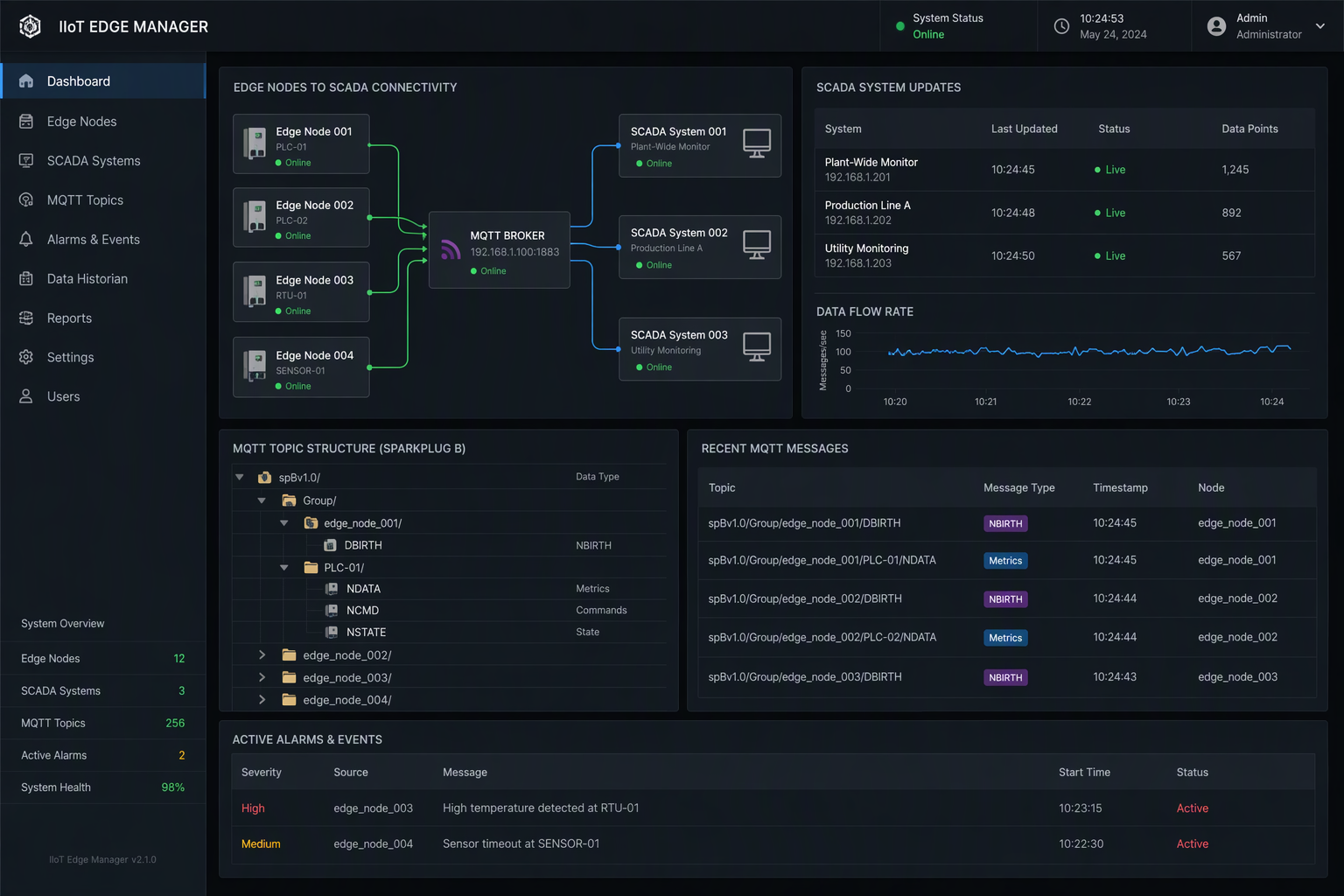
How to Implement Sparkplug B in Your IIoT Architecture
How to Implement Sparkplug B in Your IIoT Architecture

Key Highlights
- Sparkplug B gives your industrial iot data a standard topic namespace and a consistent sparkplug payload.
- An mqtt broker becomes easier to manage when every edge node follows the same message rules.
- Google Protocol Buffers keep messages compact, typed, and better suited for busy plant networks.
- Birth and death messaging adds state awareness, so you know when devices connect or drop offline.
- Node-RED and SCADA tools can publish, receive, and visualize Sparkplug B data with less custom code.
Introduction
If your plant is adding connected machines, historians, dashboards, and SCADA screens, you have likely seen how fast data integration gets messy. Sparkplug B helps bring order to industrial iot by defining how devices publish data, identify themselves, and report status. That matters in real industrial applications where uptime, clarity, and maintainability count. In this guide, you will get a practical path for implementing Sparkplug B on the plant floor, with examples controls engineers and plant managers can actually use.

Understanding Sparkplug B in IIoT
Sparkplug B is an open-source sparkplug specification for IIoT built on MQTT 3.1.1. It takes plain message transport and adds structure that industrial environments need, including standard topics, typed payloads, and lifecycle messaging.
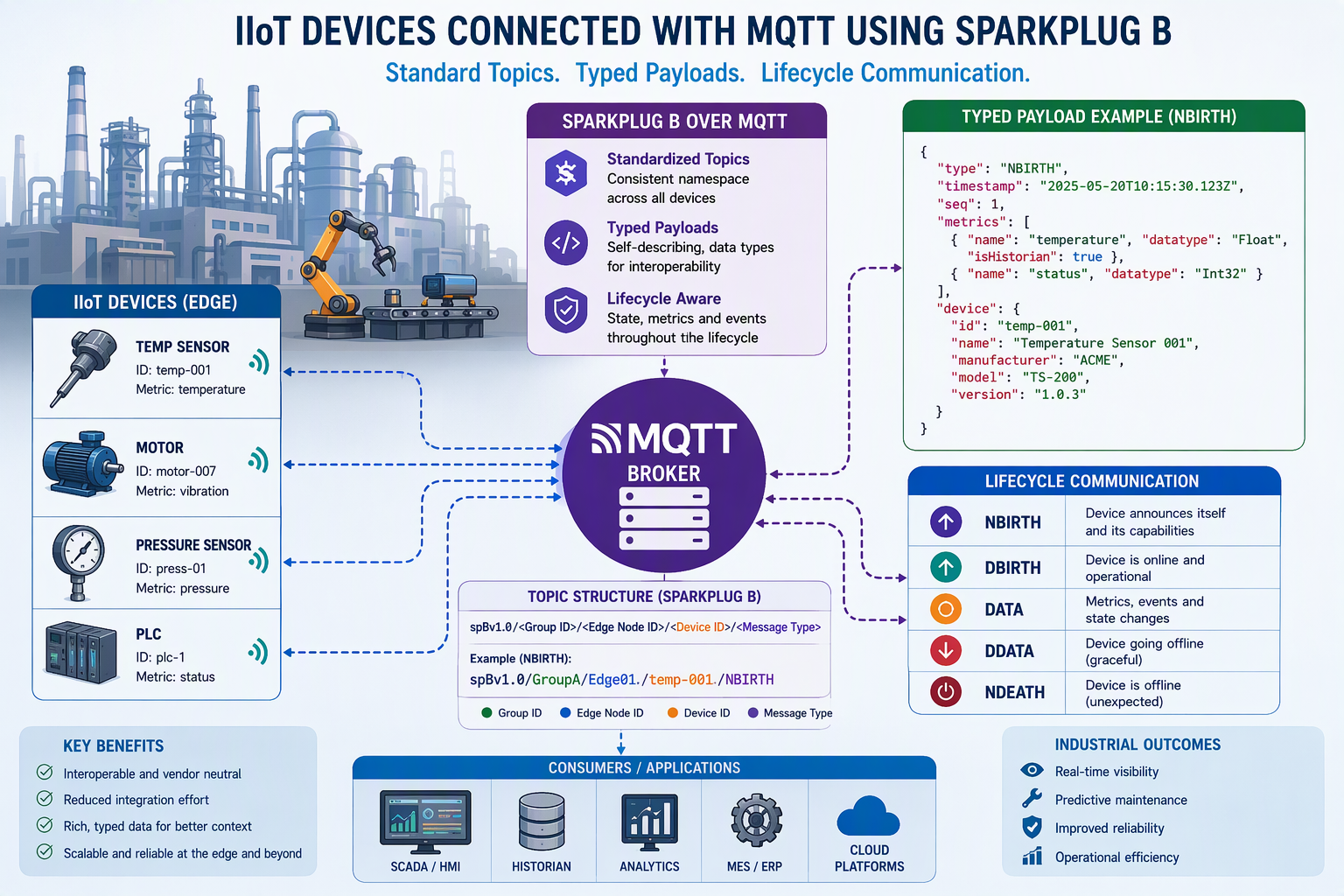
In practice, basic steps to implement mqtt sparkplug b start with choosing an MQTT broker, defining your group and node naming, mapping devices and metrics, and setting up birth, data, and death messaging. Once that foundation is in place, your applications can consume data in a predictable way.
Overview of Sparkplug B Protocol and Its Role
At a high level, Sparkplug B is a sparkplug specification that standardizes how industrial systems exchange data over MQTT. Instead of leaving every device vendor to invent its own topic names and payload rules, mqtt sparkplug b defines a shared model. That helps reduce custom integration work across machines, gateways, SCADA systems, and HMI platforms.
The sparkplug b specification uses protocol buffers to encode sparkplug messages. That means messages are compact, strongly typed, and better suited for busy networks than loose text payloads. It also supports sequence numbers, timestamps, and flags that help applications understand what they are receiving.
Common use cases include plant-floor machine monitoring, SCADA integration, unified data collection across different vendors, and command-and-control flows. You also see Sparkplug B used where edge gateways must buffer local data during outages and send it upstream after reconnection.
Key Differences Between Standard MQTT and Sparkplug B
Plain mqtt is great for message delivery, but it does not force a shared data format. One machine may publish JSON to one topic, while another sends raw values somewhere else. Sparkplug B adds a standardized framework that tells devices how to name topics and build messages.
That difference matters most in the topic namespace and payload format. Standard MQTT payloads can be anything. A sparkplug payload follows a defined structure using typed metrics and lifecycle messages. So, the main difference is not transport. It is consistency.
| Category | Plain MQTT | Sparkplug B |
|---|---|---|
| Topic namespace | Fully custom | Standardized topic namespace |
| Payload format | JSON, text, or custom binary | Structured sparkplug payload |
| Device discovery | Manual | Birth messages describe metrics |
| State handling | Limited | Built-in lifecycle awareness |
| Scalability | Depends on custom design | Better for multi-device industrial use |
Why Sparkplug B Matters for Industrial Applications
Many industrial applications fail to scale because each machine publishes data differently. Sparkplug B addresses that by giving industrial devices a shared language. Your SCADA team, controls team, and IT team can all work from the same assumptions about naming, data types, and device status.
Just as important, Sparkplug B adds state awareness. You do not just see values. You see whether a node or device is online, when it was last known good, and whether current values are live or historical. That is a big step toward a useful unified namespace.
- It supports multi-vendor machine monitoring without writing custom parsers for each asset.
- It improves alarm and dashboard reliability by exposing clear device connection state.
- It helps plants standardize data collection for SCADA, HMI, and reporting use cases.
How to Implement Sparkplug B: Planning Your IIoT Deployment
Before you configure anything, step back and map your industrial iot environment. Sparkplug B works best when you know which machines matter, what data they produce, and who will consume it. That planning step prevents naming problems and duplicate work later.
For most plants, the basic rollout starts with infrastructure review, device selection, and a clean map of data flows. Then you choose broker and client tools that support mqtt sparkplug b. The next sections break that process into practical plant-floor decisions you can act on.
Assessing Current Plant-Floor Infrastructure
Start by looking at your plant-floor infrastructure as it exists today, not as you wish it looked. Which PLCs, HMIs, gateways, and PCs are already in place? Which networks are stable, and which ones drop out? This matters because Sparkplug B depends on reliable message flow between physical devices, the broker, and subscriber applications.
Next, identify where an edge node should sit. In many industrial environments, one gateway or software service acts as the edge node for a line or cell. It gathers local machine data, publishes it upstream, and can buffer messages if connectivity is lost.
A simple example is a packaging line with three machines and one industrial PC. That PC can serve as the edge node, collect machine temperature, run state, and count data, then publish a consistent set of messages to the broker for plant-wide use.
Identifying Key Devices and Data Flows
Once the infrastructure is clear, decide which assets should publish first. Do not begin with every machine in the plant. Start with key devices that already drive downtime, quality, or throughput decisions. That keeps the first deployment focused and easier to support.
Then document your data flows. For each source, list the edge node id, device names, destination applications, and expected update rates. A mixer may send motor current and batch state every second. A utility meter may only need slower updates. Device status matters just as much as sensor data.
- Identify machines where live status affects operations, such as fillers, conveyors, or compressors.
- List the metrics each device should publish, such as temperature, humidity, counts, or setpoints.
- Note who consumes the data: SCADA, dashboards, historians, or a primary application.
Choosing an MQTT Broker for Sparkplug B Compatibility
You can use any mqtt broker as the transport layer, but your architecture still needs sparkplug b compatibility at the client and application level. In plain terms, the mqtt server must reliably pass sparkplug messages, while your publishing and subscribing tools must understand the Sparkplug rules.
Because Sparkplug B is governed through the Eclipse Foundation process, you should favor tools and libraries that align with that ecosystem and the published specification. That reduces surprises when you scale from a pilot cell to a wider rollout.
When choosing a broker, focus on operational basics first: uptime, security support, client management, and predictable session handling. Then verify that your clients can publish NBIRTH, DBIRTH, DDATA, and death messages correctly. Broker reliability is essential, but client behavior is what makes mqtt sparkplug b work.
Key Components of a Sparkplug B Architecture
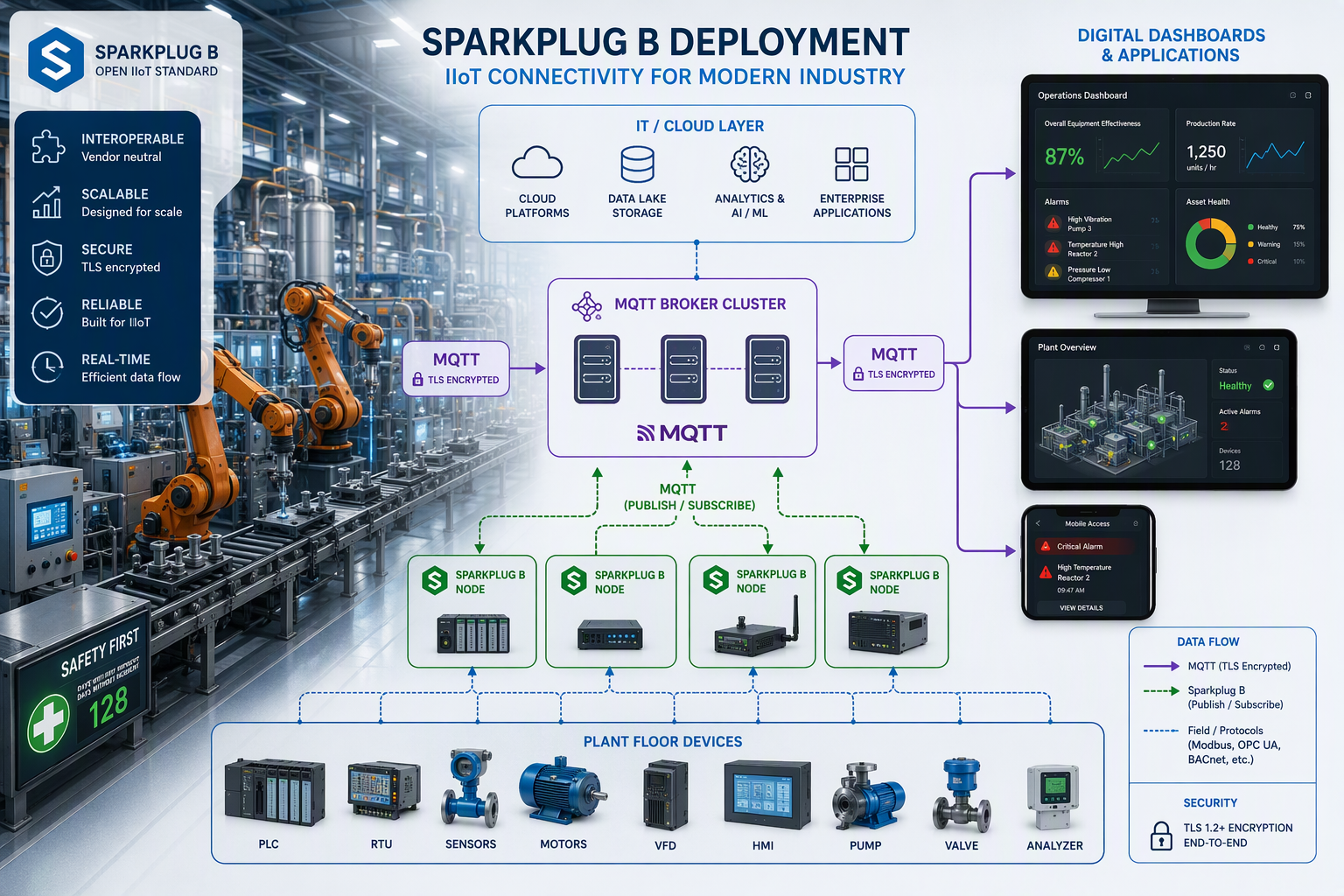
A solid sparkplug b architecture usually includes edge publishing, a broker, and one or more consuming applications. Each part has a defined job. That is why the model scales better than ad hoc scripts and one-off tags.
At the edge of network, devices or gateways collect and publish data. Upstream, scada systems, historians, and clients subscribe and act on it. Good data communication depends on all three layers behaving in a standard way, which is what the following components make possible.
Edge of Network (EoN) Nodes Explained
An edge node is the system that bridges plant devices and the MQTT broker. At the edge of network, it often runs on an industrial PC, gateway, or software platform like Node-RED. Its job is to gather field data, publish it in the right format, and manage connection state.
In many plants, one edge node handles several devices under it. It can perform local data processing before publishing, which helps reduce bandwidth and clean up raw signals. The Sparkplug model also lets the node buffer data during communication loss, then send it later with historical flags.
- It publishes birth and death status for node and device visibility.
- It packages metrics into a sparkplug b payload for upstream systems.
- It can centralize line-level data processing before data leaves the cell.
Role of SCADA Systems Like Ignition
SCADA platforms sit on the consuming side of Sparkplug B and turn incoming data into operator graphics, alarms, trends, and reports. In this architecture, systems like Ignition often act as a primary application. They listen for birth events, subscribe to data messages, and maintain a live view of connected assets.
If you are setting up Sparkplug B with Ignition SCADA software, the practical goal is simple: make sure Ignition is subscribing to the right topics and recognizing node and device lifecycle events. Once birth messages are received, the SCADA side can understand available metrics without manual tag-by-tag mapping in every case.
That is useful on a plant floor with many lines. A filler, capper, and labeler can all publish through a gateway, while Ignition collects and presents the data in one place with clearer state context.
Integrating Primary Applications and Clients
A primary application does more than subscribe. It can publish STATE messages that tell edge systems whether the main consumer is online. That lets devices change their reporting behavior. For example, a line gateway might publish every second when the primary application is active and slow down when it is not.
Clients can include SCADA, dashboards, custom services, and test tools. In mqtt sparkplug b projects, make sure these clients understand birth, data, and death patterns. Standard MQTT subscribers may receive bytes, but they will not interpret Sparkplug well without the right tooling.
- Use plugins or Sparkplug-aware nodes to decode and inspect payloads.
- Treat the primary application as an operational part of the architecture, not just a dashboard.
Confirm that downstream clients can parse data messages and device state changes.
Setting Up Your MQTT Broker for Sparkplug B
Your mqtt broker does not create Sparkplug B by itself, but its settings still shape how well the system runs. If session handling, security, and last will behavior are not set correctly, sparkplug messages may not appear when you need them.
Keep the broker role simple. It should move protocol buffers payloads reliably, maintain connections, and support the state model used by Sparkplug B clients. From there, your edge and application tools can do the rest. Here are the settings and checks that matter most.
Required Broker Features and Configuration Tips
Begin with core mqtt broker reliability. Sparkplug B depends on stable sessions, clean client identification, and predictable message routing. If your broker drops clients often or mishandles reconnects, your architecture will look unhealthy even when the machines are fine.
One key item is last will support. Sparkplug uses MQTT last will behavior so subscribers receive node death information if a client disappears unexpectedly. That is central to state awareness. You also need consistent access control so publishers and subscribers can use the expected topic namespace without permission conflicts.
- Verify support for last will and proper client reconnect behavior.
- Review topic permissions so Sparkplug publishers can use the full topic namespace.
- Use clear client IDs and session settings that match your deployment model.
Quality of Service (QoS) and Security Settings
QoS is one of the first mqtt broker settings to review. Sparkplug examples commonly use QoS levels that favor reliable delivery, especially for critical data messages and lifecycle events. The exact choice depends on your network and application needs, but you should test it with real traffic, not just bench simulations.
Security settings matter just as much. Use TLS where required, require authentication, and limit topic access. The Sparkplug model does not replace MQTT security. It relies on it. Plants that wait until after startup to lock things down usually create avoidable rework.
- Test QoS behavior for birth, death, and regular metric traffic.
- Apply authentication and topic-level permissions from day one.
- Confirm that encrypted connections do not break sparkplug b payload handling.
Verifying Sparkplug B Support and Extensions
Do not assume broker support means full Sparkplug readiness. The broker mainly passes traffic. Real sparkplug b specification support comes from the clients, nodes, and applications generating and consuming sparkplug messages correctly.
A practical verification step is to connect a test publisher and subscriber, then watch for NBIRTH, DBIRTH, DDATA, and death events. If reconnect logic works, birth messages reappear after a disconnect, and subscribers can decode the payloads, your mqtt sparkplug b stack is behaving as expected.
Some tools add extensions such as metric aliasing, buffering, or visualization helpers. Those can be useful, but first confirm that the base behavior matches the specification. Standard lifecycle and topic handling should work before you depend on extra features.
Implementing Sparkplug B Communication on the Plant Floor
Now you are ready to put Sparkplug B communication into service on the plant floor. This is where your naming, broker, and client choices become visible in real operation. Devices come online, publish metrics, and expose their state to the rest of the system.
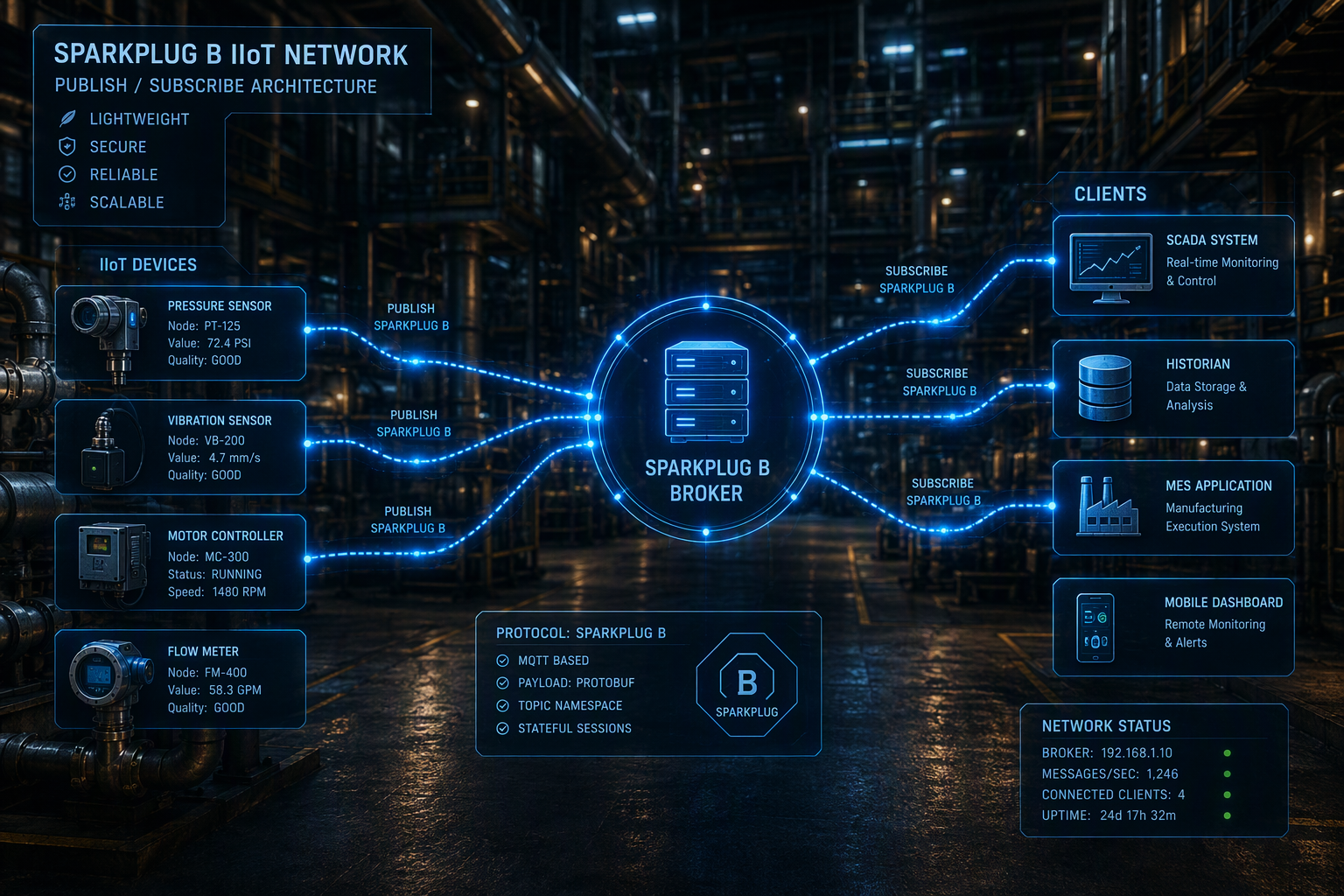
The key lifecycle pattern is simple: a birth certificate announces what a node or device can provide, and a death certificate signals loss of connection. Between those events, sparkplug b data flows as regular metric updates. The next steps show how to configure and test that behavior.
Configuring Devices for Birth and Death Messages
In Sparkplug B, devices should publish a birth certificate when they connect and a death event when they disconnect or disappear. For devices under an edge node, these are usually DBIRTH and DDEATH. The birth message declares available metrics, types, and initial values so subscribers know how to interpret future updates.
Each device id must stay consistent. If a packaging machine appears today as Filler01 and tomorrow as Fill_1, you lose continuity and confuse downstream tools. Good naming supports state awareness and makes reconnect behavior easier to trust.
- Assign stable device id values that match plant naming standards.
- Make sure your client publishes death messages through MQTT last will behavior.
- Confirm that the sparkplug b specification flow works after both planned and unplanned disconnects.
Sending and Receiving Sparkplug B Payloads
When you send a sparkplug b payload, you are not pushing loose JSON. You are sending a defined payload format built with protocol buffers. That compact binary format carries metric names, values, timestamps, and status information in a way Sparkplug-aware tools can decode consistently.
In Node-RED, the practical setup is straightforward. Install the node-red-contrib-mqtt-sparkplug-plus package, configure the broker connection, define your group and edge node name, then add the metric names and data types in the device node. Enable immediate birth publishing if you want a DBIRTH sent on connect.
To receive data, add a Sparkplug input node, subscribe to the proper topic pattern, and select the QoS level you want. A debug node can then show DBIRTH and DDATA activity. This is a good first test before tying the flow into SCADA or dashboards.
Example: Visualizing Live Data Using Node-RED
Picture a small assembly cell where one gateway publishes machine temperature and humidity. In Node-RED, you can use an inject node to simulate those values, then send them through a Sparkplug device node. On the receive side, a Sparkplug input and debug node let you inspect the resulting messages.
That gives you a quick visualization path for live data without manually writing protobuf logic. You can validate topics, watch birth events, and confirm that sparkplug b data is updating as expected. For a pilot project, that is often enough to prove the architecture before wider rollout.
- Install node-red-contrib-mqtt-sparkplug-plus in the palette manager.
- Configure broker host, port, credentials, keep alive, group, and edge name.
- Use debug output to verify DBIRTH and DDATA visualization during testing.
Troubleshooting and Optimizing Sparkplug B Deployments
Even a solid sparkplug b deployment needs troubleshooting once it meets real networks, plant maintenance windows, and mixed-vendor equipment. The good news is that Sparkplug gives you more structure to work with, which makes failures easier to isolate.
If messages are not being received, start with the basics: broker connectivity, topic naming, client state, and payload decoding. Then move into optimization with monitoring tools, aliasing, and buffering checks. These final sections focus on the issues teams hit most often in production.
Common Issues and How to Resolve Them
A common problem is that sparkplug b messages are reaching the broker, but the subscriber cannot decode them. That usually points to the wrong client tool, an incorrect topic subscription, or missing metric definitions. Another frequent issue is reconnect behavior after network failure, where births are not republished as expected.
Start troubleshooting from the outside in. Can the client connect? Is it publishing or subscribing to the correct topic path? Do you see NBIRTH or DBIRTH after restart? Sparkplug’s state awareness helps here because missing lifecycle events often reveal where data communication broke down.
- Check topic spelling, group names, edge IDs, and device IDs first.
- Verify that birth messages appear after reconnect or application restart.
- Review broker logs and client debug output when network failure is suspected.
Tools and Plugins to Monitor Sparkplug B Traffic
Because Sparkplug uses binary encoding, basic MQTT viewers may show bytes without meaning. That is why Sparkplug-aware plugins and monitoring tools are useful. They decode traffic into readable metrics, lifecycle events, and device state so you can confirm the system is behaving normally.
Node-RED is one practical option because its Sparkplug nodes handle the encoding and decoding for you. A debug pane can show DBIRTH and DDATA activity during setup. Sparkplug-aware clients also reduce the need for custom parsers, which saves engineering time and lowers maintenance burden.
- Use Node-RED Sparkplug nodes to inspect and test traffic during commissioning.
- Favor tools that expose birth, death, and data events clearly.
- Keep custom parsers to a minimum unless you have a strong reason to build them.
Conclusion
In conclusion, implementing Sparkplug B in your IIoT architecture is a strategic move that can significantly enhance your plant's efficiency and data management capabilities. By following the outlined steps—assessing your current infrastructure, selecting compatible MQTT brokers, and configuring devices for effective communication—you can ensure a smooth deployment. Remember, troubleshooting and continuous optimization are key to maintaining robust operations. As you embark on this journey, consider leveraging the expertise of Empowered Automation, a trusted systems integrator in the Chicago area. If you want to dive deeper into the potential of Sparkplug B, check out our guide on What is Sparkplug B. Start transforming your plant-floor operations today!
Frequently Asked Questions
How is Sparkplug B different from standard MQTT?
Sparkplug B uses mqtt transport, but it adds a standardized format for industrial data. Instead of arbitrary topics and payloads, it defines a topic namespace, lifecycle messaging, and a structured payload format. That makes integration more predictable than standard MQTT in multi-device plant environments.
Are there open-source libraries for Sparkplug B implementation?
Yes. Sparkplug B is an open-source specification associated with the Eclipse Foundation process, and tools such as Node-RED Sparkplug packages support implementation. These help you work with protocol buffers and lifecycle messaging without building everything from scratch with custom parsers.
How should I handle Sparkplug B birth and death messages in my plant?
Treat every Sparkplug B birth certificate and death certificate as an operational signal, not just a technical detail. Use them to track device status and state awareness in SCADA, dashboards, and alarms. Always test both planned disconnects and unexpected communication loss before go-live.
You might also like